


A Shopify migration can carry your Google rankings through the move intact, or it can undo years of organic traffic in a single afternoon, and the difference comes down to a handful of decisions you make before you ever go live. The platform itself is rarely the culprit. What costs businesses their rankings is treating the move as a clean slate and rebuilding everything at once, so that Google loses the record it has spent years building of who you are and what you deserve to rank for.
If you have grown your organic traffic over several years, that traffic is a real business asset, and it is far more fragile during a replatform than most owners expect. This post explains how to migrate to Shopify without losing your rankings: how Google sees your store, whether a redesign belongs in the move, how to handle the change in your web addresses, what to do the moment you go live, and what to expect while your rankings settle afterwards.
How does Google see your store during a migration?
The clearest way to think about your store is as two separate layers.
The first is the foundation Google has learned to trust: your web addresses, the wording on your pages, and the way those pages are structured. This is where your rankings live, and a migration has to protect it. The second is the design your customers see: the layout, the colours, the photography, and the overall feel of the site. You are free to improve this layer as much as you like.
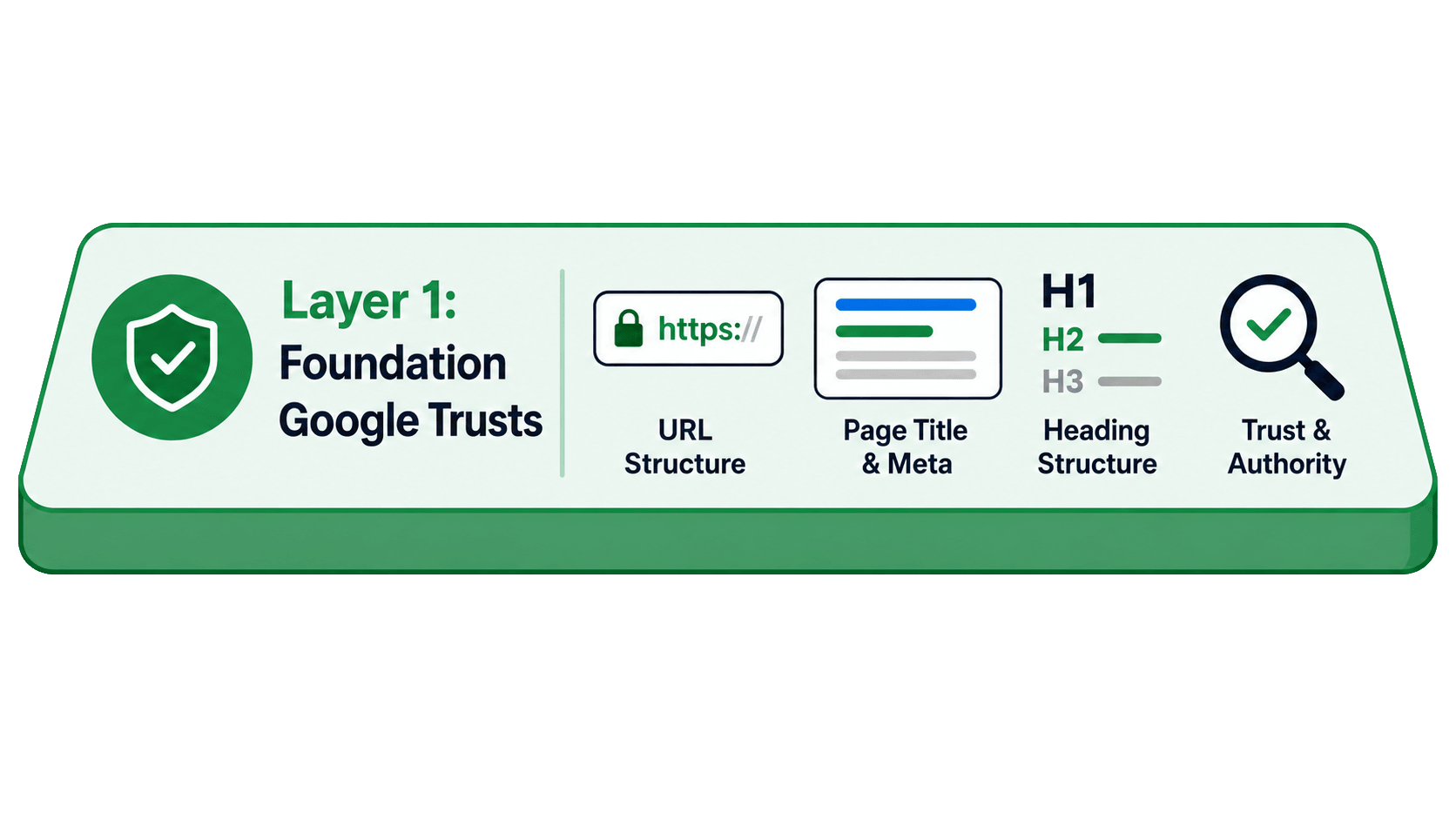
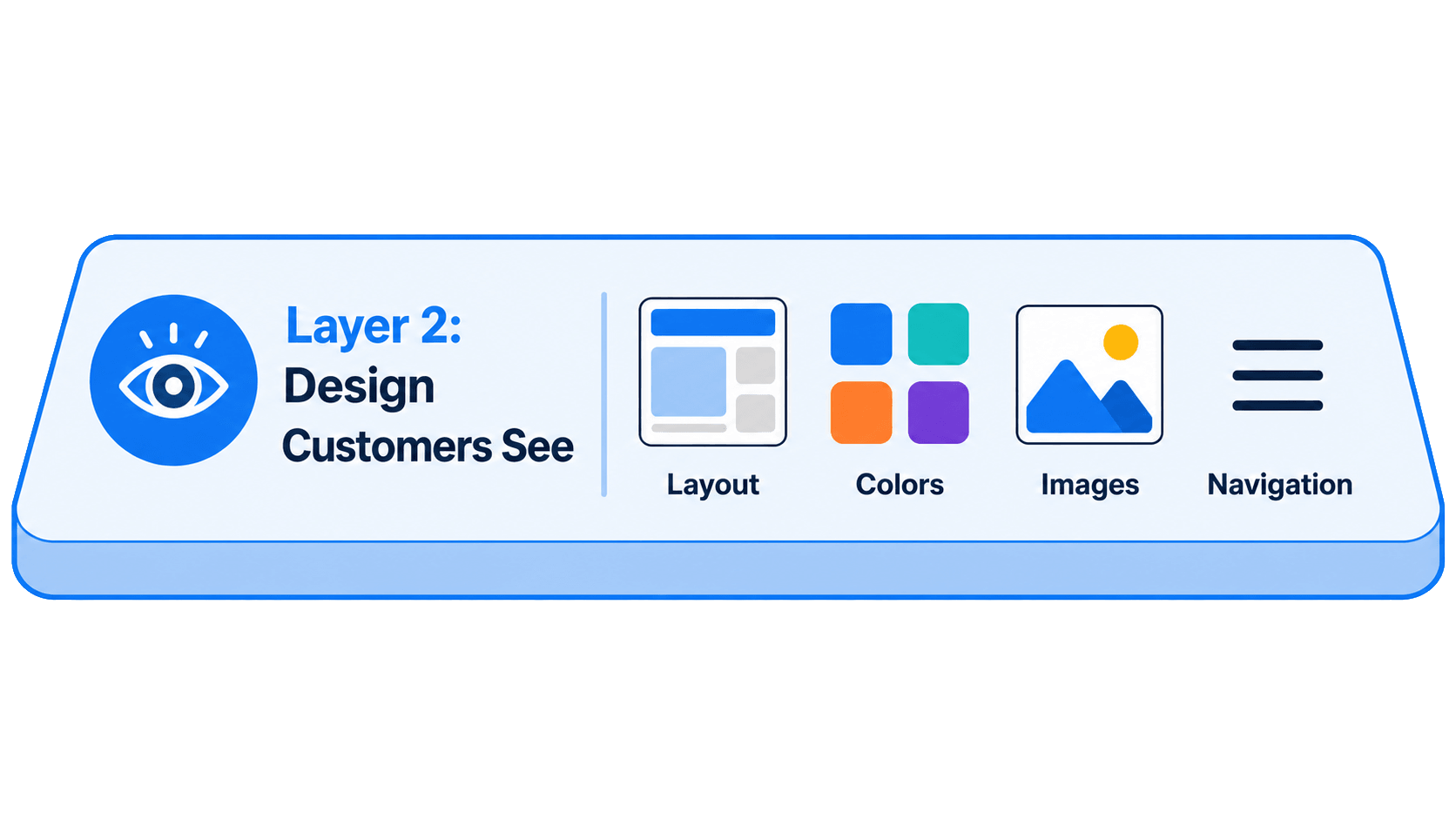
The mistake that quietly wrecks migrations is treating those two layers as one thing and rebuilding both in the same moment. Google is blunt about the risk. Its own site move guidance tells you to "expect temporary fluctuation in site ranking during the move," because a replatform is a significant change that forces Google to recrawl and reindex the whole store. Handle it well and that fluctuation is short and shallow. Handle it badly and it becomes a drop you spend months clawing back.
Should you redesign your store when you migrate to Shopify?
The honest answer is that it depends on the state of what you already have. If your current site is dated, off brand or not converting, or if no real SEO foundation was ever built into it, the migration is the right moment to put that right. If your site already ranks and converts well and the move is only about a better platform, keep the foundational changes to a minimum and improve them later, when you can measure the effect of each one on its own.
Here is why the distinction matters. A good deal of your page design contributes nothing to your Google ranking, and you can change it freely: the layout, the imagery, the navigation, and the overall feel of the site. None of that carries your rankings, so a beautiful new design wrapped around a carefully preserved foundation is both safe and, very often, exactly what the business needs. Google confirms the mechanism plainly: permanent redirects from your old URLs to your new ones "don't cause a loss in PageRank," so the ranking value sits in the addresses and content, not in the visual skin around them.
It helps to see the two sides laid out. Protect the foundation, and treat the design layer as fair game:
| Protect this (the foundation) | Improve this freely (the design) |
|---|---|
| The web address of every page that ranks | Layout and page structure on screen |
| The wording and headings Google is rewarding | Imagery, photography and colours |
| Page titles and meta descriptions | Navigation and the overall feel |
| Your internal linking and URL structure | Fonts, spacing and brand styling |
If a page ranks well, keep its web address mapped and redirected, keep its wording, and keep its page title much as it is, because that is the content Google is rewarding. Change all of it at once and, if your rankings dip, you will have no way of knowing which change caused it.
Where the old foundation is weak or missing, the logic runs the other way. If your previous site never had a proper heading structure, you are preserving nothing by leaving it out, so build it properly on the new store. The same goes for thin content: you cannot lose ranking value you never had, so adding a signal that was missing can only help. A full website redesign earns its place when the old site was letting you down, and it is worth holding back when the old site was working.
The instinct on a migration is to reinvent everything at once, and it is the one instinct worth resisting. Your rankings live in the foundation: the addresses, the words, and the structure Google has learned to trust. Wrap a beautiful new design around that foundation and you get the best of both, a store that feels new to your customers and stays familiar to Google.
Emma Smyth, Co-Founder and Creative Lead at Digital Otter
Why do Shopify migrations lose Google rankings?
Whatever you decide about a redesign, one part of the foundation has to be handled with care on every migration, and it is the part Shopify is almost certain to change. Your store's URLs are the individual web address of every page you have, and every ranking you hold is tied to a specific one. Google holds a record of those addresses, other websites link to them, and your customers may have bookmarked them.
The problem is that when you move to Shopify, almost every one of those addresses is likely to change, because Shopify structures its URLs in its own way, with products living under /products/ and categories under /collections/. A product that used to sit at one address now sits at a different one.
If you do nothing about that, the old address returns a 404 "page not found" error the moment you launch, and Google arrives to find a dead end where a ranking page used to be. Once it sees that the page no longer exists, it stops ranking it, and the traffic that address earned you goes with it. Overlooking this is the single biggest mistake you can make during a Shopify migration, and it is entirely avoidable.
The fix is a redirect: a permanent signpost that tells Google, and anyone following an old link, that the page has moved and here is its new home. The kind you want is a 301 redirect, which means the move is permanent, and Google is unambiguous that it carries your rankings across: "301 and other permanent redirects don't cause a loss in PageRank." Set one up for every page before you launch, and the trust attached to the old address flows straight through to the new one, while your visitor lands exactly where they meant to.
How do you set up 301 redirects for a Shopify migration?
Redirects only protect you if they are complete and in place before your domain switches over. Google's guidance is to redirect every old URL to its new equivalent "as you indicated in your mapping," which means the mapping has to come first. The sequence matters, so work through it in order.
- List every URL on your current site. Before you change anything, make a complete inventory: every product, every category, every blog post, every page. Nothing that ranks or earns links can be allowed to slip off the list.
- Map each old address to its new one. Once you know the URLs your new Shopify store will use, build a spreadsheet with the old address in one column and its new home in the next. This map is the backbone of the whole migration.
- Load the redirects into Shopify before launch. In your Shopify admin, go to Content, then Menus, then URL redirects. Download the sample CSV file, copy your mapped addresses into it, and bring the whole lot in at once with the Import button.
Shopify's own redirect documentation walks through the same import, and doing it in bulk is far safer than typing hundreds of redirects by hand. When your real domain finally points at the new store, every redirect is already waiting, catching the old links and sending them to the right new pages. There is no scramble on launch day, and no window in which your links are broken.
What should you do after your Shopify store goes live?
Launching is not the finish line. When any new site goes live, it can take Google a while to find and re-read everything, and during a migration that lag is exactly what you cannot afford. Google's own estimate is that "a medium-sized website can take a few weeks for most pages to move in our index," and larger stores take longer still. Your job at launch is to shorten that wait by actively inviting Google back in.
Your sitemap is how you do it. A sitemap is a single file listing every page you want Google to find, handed over like a map that says here is everything, please come and look. Shopify creates and updates this for you automatically, and you will find it by typing your domain followed by /sitemap.xml.
You then submit that map through Google Search Console, a free tool from Google.
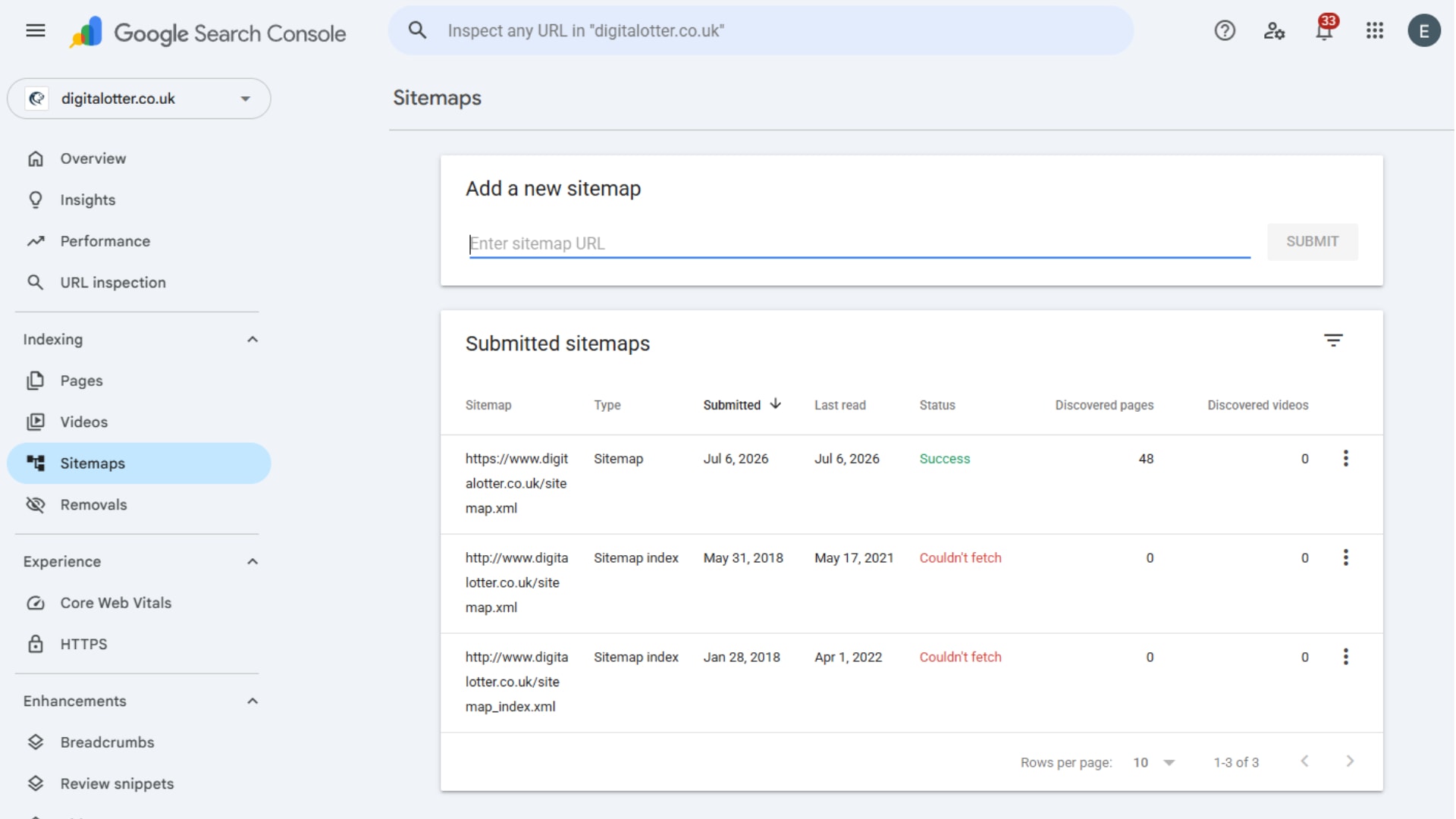
- Verify your site. Create a Search Console account and confirm that you own the domain.
- Submit the sitemap. Open the Sitemaps section, enter
sitemap.xml, and submit it. As Google puts it, this "will help Google learn about the new URLs." - Push your most important pages to the front. Go to URL Inspection, enter the address of a top page, and use Request Indexing to ask Google to recrawl it now rather than in its own time. Repeat for your best sellers and your highest-earning pages.
Together, submitting the sitemap and requesting indexing tell Google that a great deal on your store has changed and that it is worth re-reading straight away. It is the difference between Google noticing your new store in a few weeks and noticing it in a few days.
Will your rankings dip after a Shopify migration, and will they come back?
Even with a redirect in place for every page, a short dip is normal, and it helps to expect it so you do not panic and start changing things in the first fortnight. A 301 redirect passes your ranking signals to the new address, but Google still has to recrawl each URL, follow the redirect, and reprocess the store before everything settles, which is why its site move guidance warns of temporary ranking fluctuation on any significant move. The redirects protect the value, and the reprocessing simply takes a little time.
How long is a fair question, and the honest answer is that it depends on the size of your store and how cleanly the move was done. Google reckons a medium-sized site takes a few weeks for most pages to move across in its index, and larger stores take longer. In practice, a clean migration with complete redirects tends to wobble for the first few weeks and then recover over the following month or two, while a big or complex catalogue can take longer to fully settle.
Will it all come back? If your redirects are complete, your ranking pages kept their wording, and nothing important was left on a dead end, then in most cases yes: the signals transfer and your rankings return to roughly where they were, and sometimes a little higher if the new store is faster and better built. Where traffic does not fully return, the cause is almost always a gap in the groundwork rather than the move itself, whether that is pages missed off the redirect map, ranking content that was rewritten or dropped, or a slow new build. That is why the mapping and the redirects are worth getting right the first time, and why it pays to keep those redirects in place for good rather than removing them a few months later.
Final thoughts
A Shopify migration that keeps your rankings is built on four moves, and none of them is complicated once you can see the shape of the whole.
Treat your store as two layers, and protect the foundation Google trusts while you improve the design your customers see. Be honest about whether a redesign earns its place, keeping the pages that already rank as they are and rebuilding the foundation only where it was thin or missing. Before you launch, put a 301 redirect in place for every old page, so no old link ever lands on a dead end. And the moment you are live, hand Google your sitemap through Search Console and push your most important pages to the front of the queue.
Do all of that and your rankings come through the move intact, with only the brief fluctuation Google warns about along the way. Skip the groundwork and they can drop substantially, and winning them back is far slower than protecting them would have been. If you are also weighing up the budget, our guide to what a Shopify migration costs in the UK sets out the numbers, and the SEO groundwork that protects your rankings is the same work either way.
Planning a Move to Shopify?
A migration is two projects in one: a new store your customers will love, and a careful transfer of everything Google already rewards you for. If you are thinking about moving to Shopify and want it done without losing ground, get in touch and we will talk it through.
Read the full video transcript
A badly managed Shopify store migration can cost you years of Google rankings in a single afternoon, and not because of the platform choice, but because Google loses everything it has spent years learning about you.
If you have built up organic traffic over the years, those visitors are a valuable asset for your business. Retaining this traffic is more fragile during a move than you may realise.
In this video I will walk you through exactly how to move your ecommerce store to Shopify without losing your rankings: whether you should consider a redesign during your migration, how to handle changing URLs, and what to do after launch, so you can confidently move to Shopify and focus on growing your sales, instead of having to put in work to win back your lost rankings.
To start, I am going to explain how Google sees your website and how this affects the migration.
Think of your store as two separate layers. The first is the foundation Google trusts: your web addresses, the wording on your pages and the way they are structured. This is where your rankings live, and a migration has to protect it.
The second layer is the design your customers see: the layout, the colours, the photography, the overall feel. You are free to improve this layer.
The mistake that wrecks migrations is treating those two layers as one and changing everything at once. During a migration, you need to protect the foundation, and you can do almost anything you like with the design on top of it.
Here is something you may not realise. If you change the content of your pages when migrating your ecommerce store to Shopify, you can lose all the Google rankings that you have worked so hard to build up over the years.
This raises an important question: should you redesign your store when you migrate it over to Shopify?
There are, in fact, elements of your page design that do not contribute to your Google ranking, and you can freely change these elements during a migration. This includes the layout, the imagery, the navigation, and the overall feel of the site. None of that carries your rankings, so a beautiful new design wrapped around a carefully preserved foundation is both safe and, often, exactly what the business needs.
If a page ranks well, keep its web address mapped and redirected, keep its wording, and keep its page title much as it is, because that is the content Google is rewarding.
If you change all of that at once and your rankings dip, you will have no way of knowing which change caused it.
On the other hand, if your old foundation is weak, or missing entirely, the migration is the moment to put it right. Say your old site never had SEO foundations put in place, for instance no proper heading structure. You are not preserving anything by leaving it out, so build it properly when you migrate to your new site.
The same goes for thin content. You cannot lose ranking value you never had, so adding a signal that was missing is only going to be beneficial.
To summarise: if your current design is dated, off brand, not converting, or if no SEO was ever built properly, you should add a redesign to your migration.
But if your current site already ranks and converts well and the move is about a better platform, not a better site, it is best to keep those foundational changes to a minimum and improve them later when you can track the changes.
That brings us on to the next topic. Within the heart of your site foundation is your store's URLs. These are the individual web addresses of every page you have. Google has a record of those addresses, other sites link to them, and customers may have bookmarked them. Every ranking you hold is tied to a specific address.
The problem is that when you move to Shopify, the web address of every page is likely to change, because Shopify structures its URLs in its own unique way. So a product that used to live at one address now lives at a different one.
If you do nothing about that, when you launch your new site, the old address shows the 404 "page not found" error, and essentially Google finds a dead end where a ranking page used to be. When Google sees the page no longer exists, it will stop ranking it.
Overlooking this is the single biggest mistake you can make during your Shopify migration. However, it can be avoided, and I will explain how.
The fix is putting in place a redirect. This is a permanent signpost that tells Google, and anyone following an old link, that this page has moved, and here is its new home. Set one up for every page before you launch, and all the trust attached to the old address flows through to the new one. Your ranking carries over, and your visitor lands directly on the new address.
The kind of redirect you want to use is called a 301 redirect, which means the move is permanent. I will explain how you can set these up and the correct sequence to do it in.
First, before you change anything, make a complete list of every page from your current site: every product, every category, every blog post, everything.
Second, once you know the URLs from your new Shopify store, create a spreadsheet which maps each old address to its new one.
Third, set the redirects up in Shopify before your new site is live.
You can do this in your Shopify admin under Content, Menus, then URL redirects. Download the sample CSV file from Shopify, copy your mapped URLs over, then import the whole lot at once using the Import button.
At launch, when your real domain switches over to the new store, every one of those redirects is already in place, catching the old links and sending them to the right new pages. That means there is no scramble on launch day, and no window where your links are broken.
During a migration, once the site is launched, the work is not quite over yet.
Did you know that when you launch any new website it can take Google weeks to even find all the pages on your new site, let alone start showing them in search?
If you are migrating an ecommerce store to Shopify, that could be a disaster, when you need Google to read the updated site structure and page content as soon as possible to preserve your rankings.
What you need to do is actively invite Google back into your site, and you can use your sitemap to do this.
A sitemap is a single file that lists every page on your site you want Google to find. Think of it as a map you hand to Google, saying here is everything, please come and take a look. Shopify creates and updates this for you automatically. To find it, type in your domain followed by forward slash, sitemap, dot XML.
You need to submit that map to Google, using a free tool called Google Search Console.
First, create an account and verify that you own the site. Open the Sitemaps section, type in sitemap dot xml, and submit it.
To speed up your most important pages even more, navigate to URL inspection, type in the URLs of your top pages, and hit the Request Indexing button.
During a migration, submitting your sitemap and pages for indexing is how you tell Google there is a lot on your website that has changed, and to come and re-read it now.
So here is the summary of how to move your store to Shopify without losing your rankings.
Think of your store as two layers: the foundation Google trusts, which you protect, and the design your customers see, which you are free to improve.
Be honest about whether a redesign earns its place: keep the pages that already rank exactly as they are, and where the old foundation was thin or missing, build it properly as you go.
Before you launch, set up 301 redirects for every page from your old site, so no old link ever lands on a dead end.
The moment you are live, hand Google your sitemap through Search Console so it re-reads everything quickly, and push your most important pages to the front of the queue using site indexing.
If you do all of this, your rankings will come through the move intact. Get it wrong, and they may drop substantially.
Good luck with your site migration, and if you have any questions feel free to drop them in the comments section below.
Related Posts



Get in touch - we're happy to chat.