

Most Shopify stores that fail to convert do not have one single fatal flaw. They tend to have several smaller issues stacking up, each one quietly clipping a few percent off the conversion rate until the maths stops working. The good news is that almost every one of those issues has a known fix, and you do not need to start from scratch to put them right.
This post walks through the most common reasons Shopify stores underperform, in roughly the order you should investigate them. We will cover the user experience, the conversion fundamentals, and the technical issues that often hide behind both.
Start by checking whether traffic is the issue
Before you assume the store is broken, it is worth confirming you actually have enough qualified visitors to draw a conclusion from. A Shopify store with 200 visits a month and zero sales is not necessarily a conversion problem. It might be a traffic problem with a conversion problem hiding behind it.
The benchmark figures vary by category, but a healthy ecommerce conversion rate tends to sit somewhere in the 2 to 4 percent range, with strong stores in fashion, beauty, and consumables often pushing higher. If your store is sitting on a few hundred visits a month and converting at 1 percent, the headline issue is volume, not the storefront. If you are bringing in thousands of visits a month and converting at 0.3 percent, you have a genuine conversion problem to investigate.
Open Google Analytics, look at sessions over the last 90 days, and segment by source. See where the people coming to your store are actually coming from. Paid traffic that is poorly targeted can mask a perfectly competent store. Organic traffic that is mostly informational can also drag your conversion rate down without anything being wrong with the experience itself. Diagnosing the right problem first saves you from spending months optimising a store that simply does not have enough visitors to test against.
Your product pages don't give buyers enough to commit
The product page is where most Shopify sales are won or lost, and it is where the default Shopify themes do the least to help you. Out of the box, you get a product title, a short description, a single image gallery, and a buy button. That is enough to list a product, but it is rarely enough to sell one.
Buyers landing on a product page are usually trying to answer a small set of questions in a few seconds: is this the right product for me, can I trust this brand, what does it actually look like in real life, and what happens if it is not right when it arrives. If your page does not answer those questions clearly and quickly, the visitor will leave and look at a competitor who does.
The strongest Shopify product pages tend to share a few traits. They use a wide range of imagery, including studio shots, lifestyle photography, scale references, and short video where it adds value. They write copy that answers practical questions rather than reading like a brochure. They show reviews near the top of the page, ideally with photos and specifics rather than just star counts.
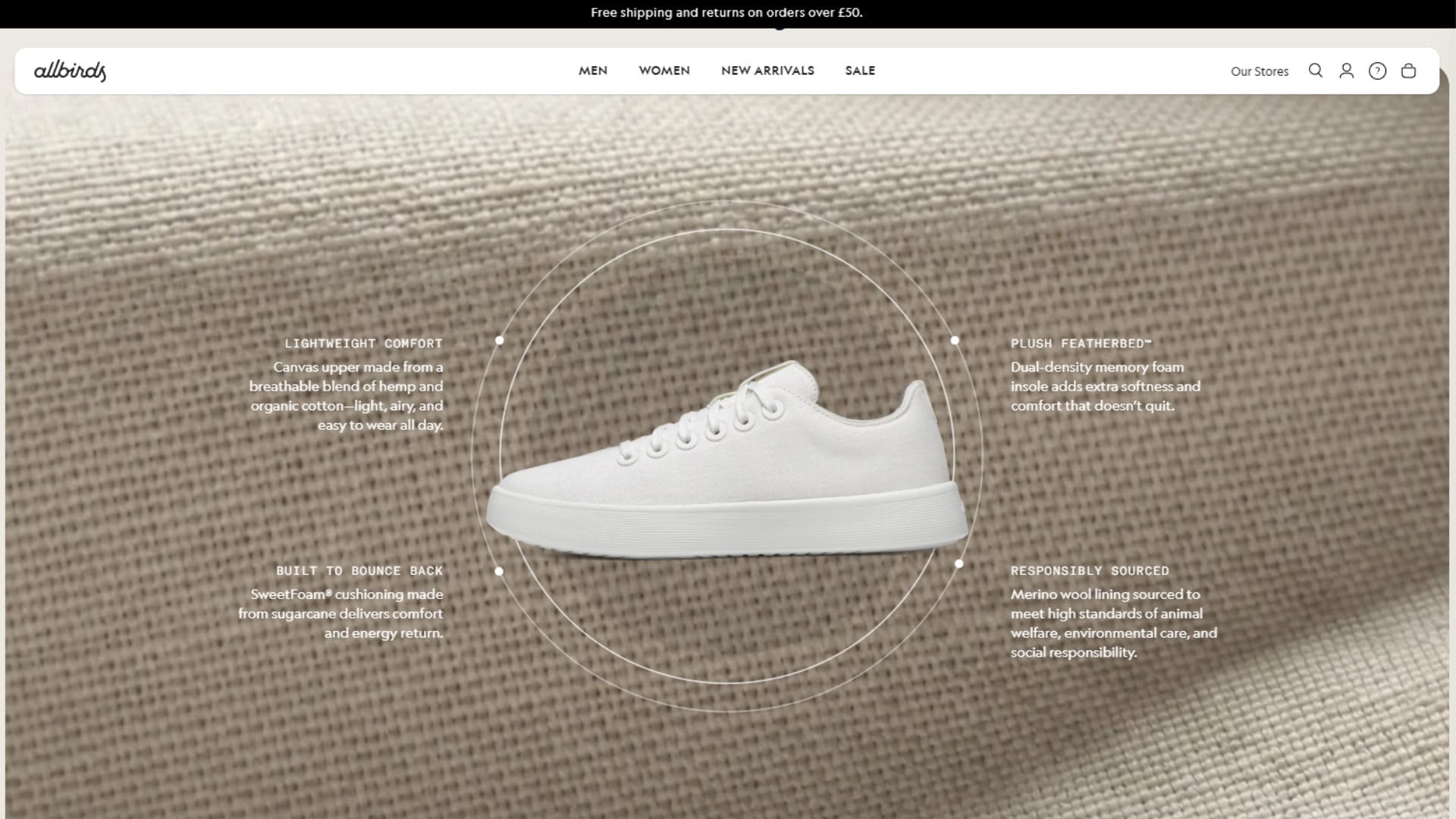
Allbirds is a long-standing example of this approach done well: every product page pairs clean lifestyle imagery with transparent information on materials and carbon footprint, which gives a sustainability-led buyer a clear reason to commit.
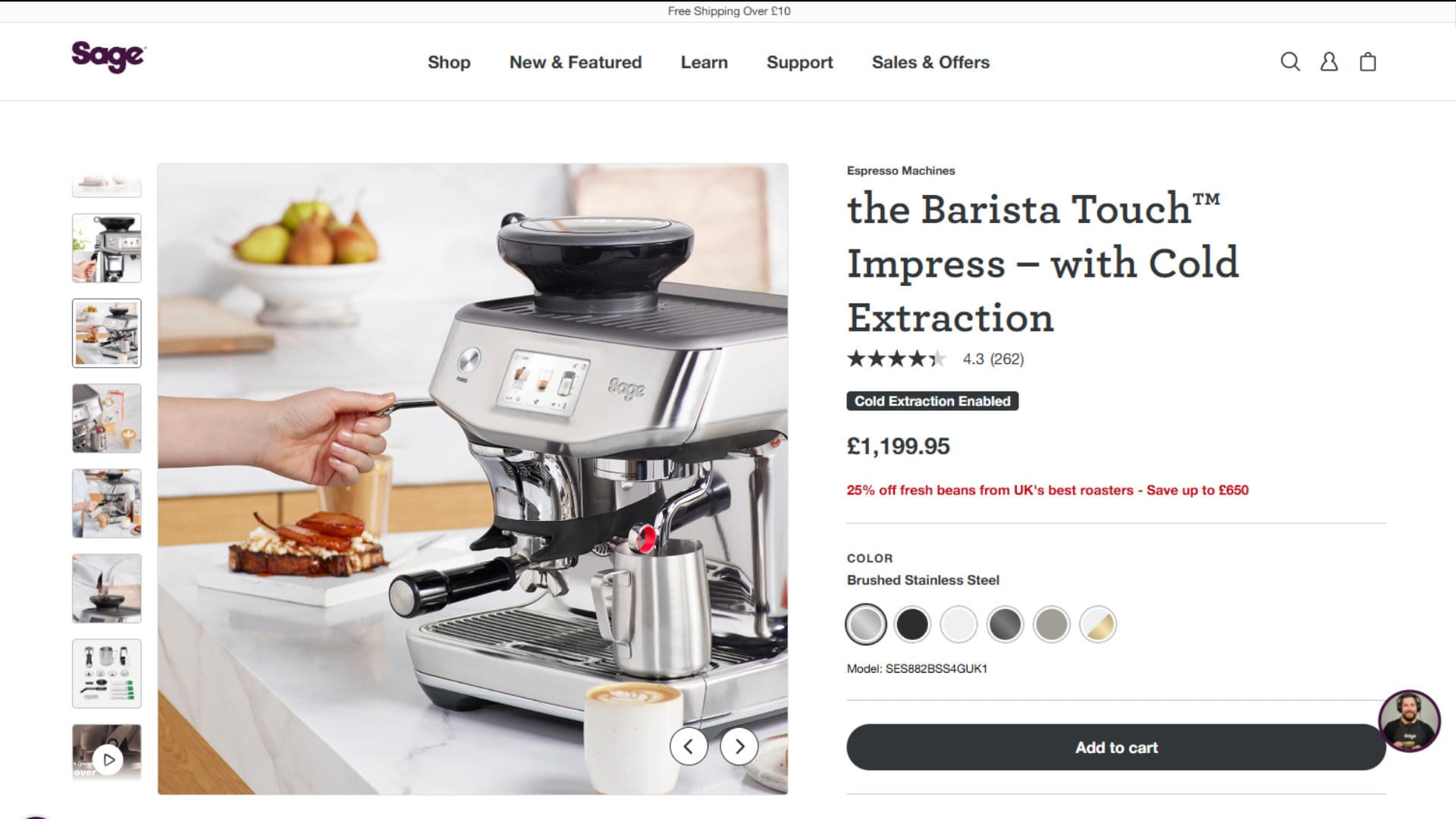
Sage Appliances takes a different, but equally effective approach on its higher-priced kitchen products, leaning on technical detail and demonstration video to justify the spend rather than relying on lifestyle imagery alone. The right pattern depends on what you sell, but the principle is consistent: give the buyer enough to commit without making them work for it.
The store is harder to navigate than you realise
Navigation problems are easy to miss when you built the store yourself, because you know where everything is. Visitors do not. They land on a product, decide they want to look at related options, and try to find a way to do so without going back to the homepage and starting again.
The most common navigation issues we audit on Shopify stores tend to fall into a handful of recurring patterns:
- Collections hidden behind a single 'Shop' link, forcing buyers to drill down before they see what is even available.
- Mega menus that list categories alphabetically rather than the way customers actually think about them.
- Search bars that only return exact matches, missing obvious synonyms and category terms.
- Filter and sort options buried on mobile, often behind small icons that are easy to miss.
- Breadcrumbs that disappear on mobile, leaving shoppers without a clear sense of where they are in the store.
Given that mobile now accounts for the majority of ecommerce traffic in the UK, a navigation experience that only works comfortably on desktop is leaving meaningful revenue on the table.
A useful exercise is to ask a friend who has never seen the store to find a specific product without using the search bar. Watch where they hesitate, where they backtrack, and where they give up. The patterns that emerge from a single test are usually the ones costing you the most sales. We covered this in more detail in our post on common website mistakes and how to fix them, and most of them apply to Shopify stores as readily as to any other site.
Friction in the checkout is killing completed purchases
Cart abandonment is a constant in ecommerce, and the average rate across studies sits at around 70 percent according to the Baymard Institute. A portion of that is unavoidable. People browse, they save items for later, they compare across stores, and they get distracted. The portion you can recover is the portion driven by friction, and that friction tends to come from a small number of recurring sources.
The biggest by some distance is unexpected costs. Baymard Institute research puts this at around 48 percent of all abandonments, making it the single largest fixable cause. If shipping, taxes, or fees only appear at the final step of checkout, a meaningful share of buyers will abandon out of frustration regardless of how reasonable the actual amount is. Showing the all-in price as early as possible, ideally on the product page or the cart, removes that surprise.
Even when costs are shown upfront, shipping that is simply priced too high is its own conversion killer. Shoppers do a quick mental calculation against the order value, and a delivery fee that feels disproportionate will lose the sale even with no surprise involved. If free shipping is not commercially viable, the common workarounds are setting a minimum order threshold for free delivery, building delivery into product prices where the margin allows, or offering a flat rate that customers can predict in advance.
Forced account creation is another reliable conversion killer. Guest checkout has been a basic expectation for years, and Shopify supports it natively, but plenty of stores still have it switched off in pursuit of email captures. There are better ways to build an email list than blocking the sale.
Beyond that, watch for limited payment options, slow-loading checkout pages, and any third-party app that injects extra steps into the flow. Shopify Payments handles the heavy lifting for most stores, and the standard Shop Pay flow tends to outperform almost any custom checkout you can build on top of it. If your data shows people consistently dropping out at the same stage, that is the stage to focus on first.
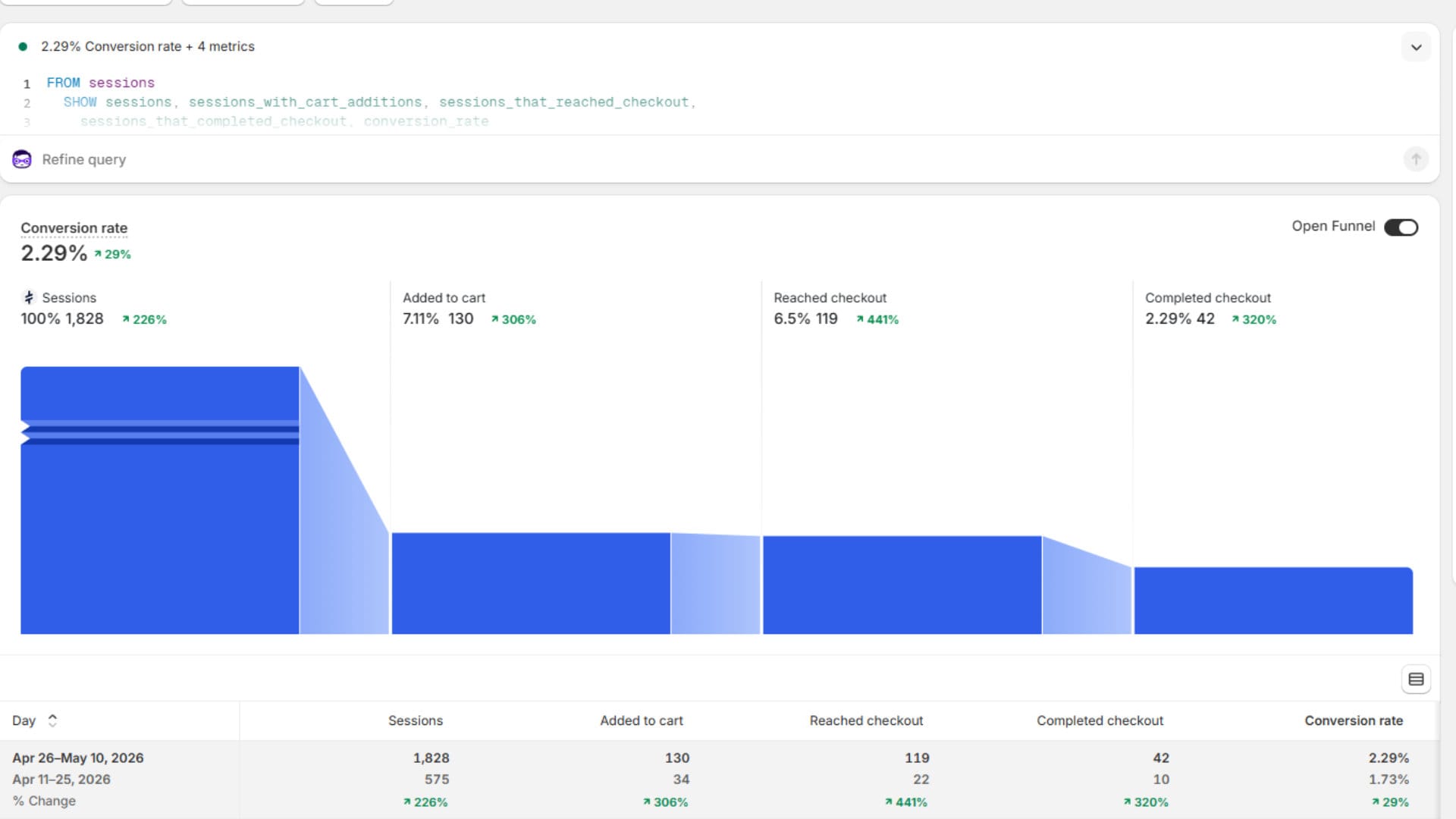
The image above shows a Shopify Analytics funnel from a store in its early growth phase. The numbers themselves reveal something worth investigating - only 42 of 119 sessions completed the purchase, a checkout completion rate of around 35 percent. A well-optimised checkout typically converts between 45 and 60 percent of people who reach it, so there is a gap here. Unexpected shipping costs, limited payment options, or a slow-loading checkout page are likely culprits at this stage of the funnel, and they are all worth examining before spending more money on traffic.
Slow load times are quietly costing you sales
Site speed is one of the few issues that affects every visitor, every page, and every step of the funnel, and it is also one of the most under-investigated. Research from Portent found that a site loading in one second has a conversion rate roughly five times higher than one loading in ten seconds, and the steepest drop-off happens in the first few seconds. Google's own data on Core Web Vitals tells a similar story: stores that meet the recommended thresholds for loading, interactivity, and visual stability tend to see materially better engagement than those that do not.
Shopify's underlying platform is fast, but most performance problems creep in through the theme and the apps. Themes built around dozens of merchandising features tend to load far more code than any individual store actually uses. Apps for reviews, upsells, pop-ups, live chat, currency conversion, and analytics each add their own scripts, and the cumulative weight on a single product page can easily run into the megabytes.
The fastest-improving move for most stores is an honest audit of installed apps. If an app is not directly contributing to revenue or operations, it is probably worth removing. Image optimisation is the next obvious lever, since most Shopify themes will serve modern image formats automatically, but oversized hero images and uncompressed product photography are still a frequent culprit. For stores at scale, moving to a more performance-focused theme such as Shopify's own Dawn, or a custom-built theme designed around your specific feature set, often pays back the investment within months.
Shopify's defaults are not enough for SEO
There is a persistent assumption that Shopify is fine for SEO out of the box. It is not bad, but it is not strong either. The default URL structure, with its forced /products/ and /collections/ segments, is workable rather than ideal. The default meta data is generic, the default heading structure on most themes is inconsistent, and Shopify's blog functionality, while perfectly serviceable, sits a long way behind WordPress for content marketing flexibility.
The most common SEO issues we audit on Shopify stores include collection pages with no descriptive copy, product pages with manufacturer-supplied descriptions duplicated across thousands of other stores, missing or auto-generated meta titles, and a complete absence of internal linking between related products and collections. Each of these is fixable, and none of them require a rebuild.
A reasonable starting point is to write proper meta titles and descriptions for your top 20 collection and product pages, add unique introductory copy at the top of each collection page, and rewrite product descriptions in your own voice rather than the supplier's. As a rough guide for how much copy each page actually needs, Yoast's SEO research and our own audit experience point to the following minimums:
- Collection pages: at least 200 to 300 words of unique introductory copy above the product grid, with longer supporting content underneath where the keyword is competitive.
- Product pages: at least 300 words combining the description, specifications, and answers to the questions buyers commonly ask. Volume matters less than relevance: write enough to genuinely cover the product, no more.
- Homepage: prioritise clarity and trust signals over word count. A concise, benefit-led homepage usually outperforms a wall of text.
From there, structured data via a reputable schema app, a tightened-up internal linking strategy, and a content plan that targets the questions your buyers actually search for will move the needle further than any single technical change. If you suspect SEO is the bottleneck rather than the storefront itself, we offer free advice and audits on this side of the work, so you are welcome to get in touch.
Final thoughts
When a Shopify store is not selling, the temptation is to either tear it down and start again or to keep tweaking colours and copy in the hope that something lands. Neither approach tends to work. The stores we see turn around quickest are the ones whose owners are willing to investigate methodically: confirm the traffic, audit the product pages, walk the checkout themselves, measure the speed, and fix the SEO basics in a sensible order.
None of the issues covered here are exotic, and none of them require a complete rebuild. They do, however, require someone with the time and the experience to look at the store with fresh eyes and prioritise the work that will move conversion rather than the work that simply feels productive.
If you have made changes already and the numbers have not improved, that is usually a sign the diagnosis was off rather than the execution. Start at the top of the funnel, work down, and let the data tell you which problem to solve next.
Want a Second Opinion on Your Shopify Store?
If your Shopify store is not converting the way you expected, an experienced pair of eyes will often spot the issues quickest. We audit Shopify stores across the UK and further afield, identify the issues that are actually costing you sales, and help you fix them in priority order. We are happy to start with a conversation about where you are stuck.
Related Posts


Get in touch - we're happy to chat.